# Building AI Agent Memory Systems: From Amnesiac Chatbots to Persistent Context
You finish a conversation with an AI coding agent. You close the tab. Two hours later, you open a new session and...
"Hi! I'm your AI assistant. How can I help you today?"
Every preference you stated, every architectural decision you made, every "don't use TypeScript for this project" — gone. Vaporized. The agent is a blank slate again.
This isn't a minor inconvenience. It's a fundamental architecture problem. An agent without memory is a consultant who reads your documentation from scratch every single visit. It's expensive, it's slow, and it erodes the trust relationship that makes agent-assisted development work in the first place.
At SMF Works, we've been running multi-agent Hermes setups with persistent memory since early 2026. Here's what we've learned about building memory systems that actually work — the patterns, the pitfalls, and the production hardening that most tutorials skip.
The Three Layers of Agent Memory
Not all memory is the same. Production agent memory breaks down into three distinct layers, each with different storage requirements, retrieval patterns, and failure modes.
Layer 1: Working Memory (The Conversation)
This is what most people think of when they say "context" — the active conversation thread, loaded into the LLM's context window every turn. It's the most expensive memory (you pay tokens for every retrieval) and the most ephemeral (it vanishes when the session ends).
Working memory is your agent's RAM. It's fast, it's precise, and it has a hard ceiling. GPT-4 class models cap around 128K tokens. DeepSeek-V4 pushes to 256K. But those aren't just "your" tokens — system prompts, tool definitions, and skill documents all eat into that budget before you type a single word.
The key insight: working memory management isn't about storing more. It's about storing *smarter*. Context compression — summarizing earlier turns so the agent retains the gist without burning tokens on verbatim history — is a necessity, not a nice-to-have. Hermes does this automatically when context usage crosses a threshold, but the principle applies to any agent system.
Layer 2: Session Memory (The Notebook)
Session memory persists across conversations. When I tell my Hermes profile "I prefer Python with type hints, and I use Ruff for linting," that fact should survive session resets. This is your agent's filesystem — structured data that outlives any single conversation.
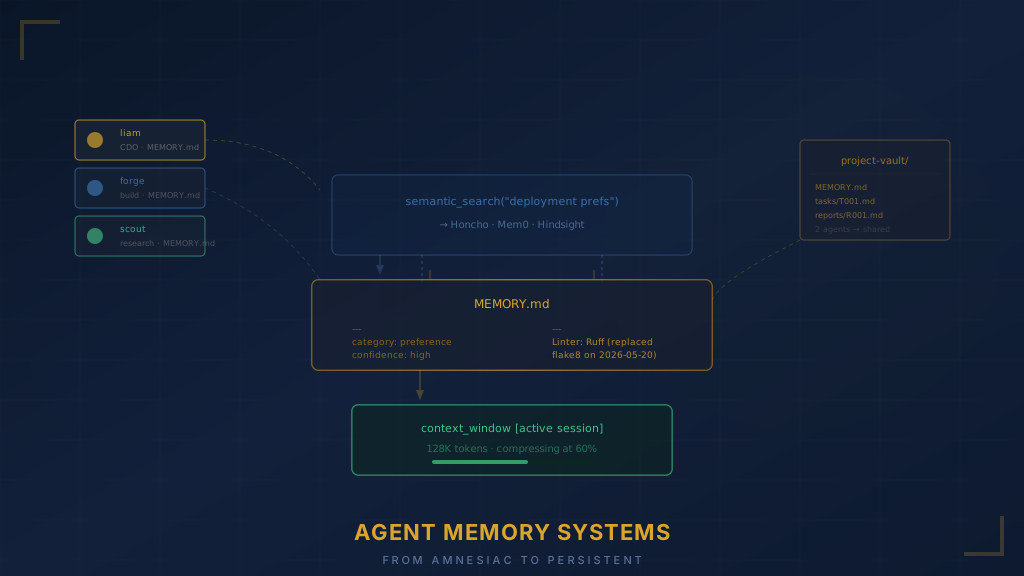
The simplest implementation is a flat markdown file. Hermes uses `MEMORY.md` for global facts and `USER.md` for user preferences. These get loaded into the system prompt at session start, so the agent "remembers" without re-deriving everything from scratch.
```markdown # MEMORY.md ## User Preferences - Preferred language: Python, with type hints - Linter: Ruff (not flake8) - Commit style: conventional commits - Dislikes: jQuery, class-based Django views
Project: smfworks-site - Stack: Hugo, deployed on Netlify - Branch naming: feature/{ticket-number}-{description} - Never deploy on Fridays ```
This looks trivial. It's not. The design decisions here matter.
Declarative vs. Imperative: Write memory as facts ("User prefers Ruff"), not instructions ("Always use Ruff"). The agent doesn't need you to write its prompts for it — it needs ground truth to make its own decisions. Declarative memory composes better, causes fewer conflicts, and degrades more gracefully when it goes stale.
Tagging for Retrieval: As your memory file grows past 50 entries, the agent starts skipping items near the bottom. Adding YAML frontmatter tags — `category: preference`, `project: smf-predict`, `confidence: high` — gives you topic-based retrieval without changing the storage format. The agent can grep for relevant sections instead of loading everything every time.
```markdown --- added: 2026-06-01 category: decision project: smfworks-site confidence: high --- Deploy schedule: Tuesday/Thursday only. Never Friday deploys. ```
Per-Project Isolation: Keep project-specific facts in separate files (`~/.hermes/memory/smfworks-site.md`, `~/.hermes/memory/smf-predict.md`) and reference them from the global memory. This prevents context pollution — when you're working on the marketing site, you don't need 40 lines of machine learning pipeline configuration in your prompt.
Layer 3: Semantic Memory (The Search Engine)
Flat files work up to a point. When your agent accumulates hundreds of facts across dozens of sessions, you need something that can retrieve relevant context by *meaning*, not just by keyword match.
This is where semantic memory providers come in. Hermes supports three external memory backends:
| Provider | Best For | Setup Complexity | |----------|----------|-----------------| | Honcho | Deep user modeling, dialectic Q&A | Medium (API key) | | Hindsight | Knowledge graph, entity resolution | High (local service) | | Mem0 | Simple cloud fact storage | Low (API key) |
The practical difference: Honcho stores facts and can *reason about them* — you can ask it "what did the user say about deployment preferences?" and it'll synthesize an answer from stored context. Mem0 is simpler — store a fact, retrieve a fact. Hindsight builds entity relationships, which is powerful but requires more infrastructure.
```bash # Enable external memory hermes config set memory.provider honcho hermes config set memory.memory_enabled true hermes config set memory.user_profile_enabled true ```
For most teams, I recommend starting with flat files (Layer 2) and adding Honcho or Mem0 only when you consistently hit 100+ stored facts. Semantic memory adds latency, cost, and a new failure mode — it needs to justify itself with retrieval quality that flat grep can't match.
The Memory Write Problem
Most agent memory documentation focuses on *reading* — how to load context back in. But the harder problem is *writing* — when and what to persist.
Write too eagerly, and your memory bloats with trivia. "User asked about the weather" is not worth storing. "User's production server is at 10.0.1.50 with 32GB RAM" probably is.
Write too conservatively, and your agent forgets important context between sessions. The art is in classification: what categories of information deserve persistence?
Here's the framework I use:
| Category | Persist? | Example | |----------|---------|---------| | User preferences | Always | "I use zsh, not bash" | | Project decisions | Always | "We chose SQLite over PostgreSQL for this project" | | Task completions | Summarize | "Refactored the auth module — see commit abc123" | | Debug sessions | Key findings only | "The race condition was in `worker.py:142`" | | Casual conversation | Never | "How was your weekend?" |
Hermes handles this through its memory skill, which classifies statements before writing. But if you're building your own system, you need an explicit classification step — either as a separate LLM call (expensive but accurate) or as rule-based heuristics on the front end (cheap but brittle).
The classification doesn't need to be perfect. A 90% precision system that occasionally forgets a preference is better than a system that drowns in noise. Err on the side of forgetting. Your user will happily repeat a preference. They won't forgive an agent that can't find the real signal in a swamp of stored trivia.
Multi-Agent Memory Architecture
Here's where it gets interesting. When you run multiple agents (we have five Hermes profiles running simultaneously at SMF Works), memory isolation becomes critical.
Each agent profile gets its own memory namespace:
``` ~/.hermes/profiles/liam/MEMORY.md # CDO's preferences ~/.hermes/profiles/forge/MEMORY.md # Build agent's context ~/.hermes/profiles/scout/MEMORY.md # Research agent's context ~/.hermes/profiles/sage/MEMORY.md # Analysis agent's context ~/.hermes/profiles/scribe/MEMORY.md # Content agent's context ```
This isn't just about separation of concerns — it's about preventing *context contamination*. The build agent doesn't need to know that the CDO prefers Americano over latte. The research agent doesn't need the deployment schedule. When you share memory indiscriminately, every agent's prompt gets longer, every token budget gets tighter, and the probability of contradictory context goes up.
But sometimes agents *need* to share information. The solution: project-level memory stored in a shared vault, referenced by agents that need it.
``` ~/project-vault/smfworks-site/ ├── MEMORY.md # Shared project facts (all agents can read) ├── tasks/ # Task assignments (written by CDO, read by workers) │ ├── T001-auth.md # Task brief with requirements and acceptance criteria │ └── T002-api.md └── reports/ # Status reports (written by workers, read by CDO) ├── R001-forge.md └── R002-scout.md ```
This is the three-layer delegation pattern applied to memory. Project vault for shared context, direct spawning for real-time coordination, cron for recurring duties. Each layer has its own memory contract.
Memory Consistency and Invalidation
Here's the problem nobody talks about: memory goes stale.
Three months ago, you told your agent "I use flake8 for linting." Last month, you switched to Ruff. You told the agent in a conversation. It updated `MEMORY.md`. But did it remove the old fact? Did it update the per-project overrides? Did it propagate to the other agents that share a project vault?
There are four strategies for handling memory invalidation:
1. Timestamp Everything
Every memory entry gets an `added` date. During retrieval, the agent can sort by recency and surface newer facts first. This doesn't *fix* stale memory, but it gives the agent the information it needs to resolve conflicts.
```markdown --- added: 2026-03-15 category: preference confidence: medium --- Linter: flake8 ```
```markdown --- added: 2026-05-20 category: preference confidence: high --- Linter: Ruff (replaced flake8) ```
2. Explicit Contradiction Detection
On every memory write, run a quick check: does this new fact contradict anything already stored? If so, flag the old entry for review or auto-replace it. This requires either a second LLM call (expensive) or string matching on key terms (cheap but imprecise).
3. Periodic Pruning
Once a month, review your memory files. Delete entries that are obviously stale. Merge duplicates. This is the manual approach, and honestly, for most teams with fewer than 200 stored facts, it works fine.
```bash # Hermes session search helps here — find past conversations about # topics that might be outdated hermes sessions search "linting preferences"
# Then manually verify and update MEMORY.md ```
4. Confidence Decay
Tag facts with a confidence level, and decay confidence over time. A preference stated once gets `confidence: low`. Stated three times across a week? `confidence: high`. Referenced again months later? The old confidence degrades, prompting the agent to re-verify.
In practice, I use strategies 1 and 3 together. Timestamps give the agent enough context to make good decisions most of the time, and monthly pruning catches the edge cases. Strategies 2 and 4 are worth implementing if you're running a large team where memory conflicts cause real problems.
Building Your Own Memory System: A Practical Guide
If you're building an agent from scratch (not using Hermes), here's a minimal memory system that handles 80% of cases:
Step 1: Create the Memory File
```python import os from datetime import datetime
MEMORY_PATH = os.path.expanduser("~/.agent/MEMORY.md")
def write_memory(fact: str, category: str = "general", project: str = None, confidence: str = "medium"): """Append a fact to the memory file with metadata.""" timestamp = datetime.now().strftime("%Y-%m-%d") entry = f"""--- added: {timestamp} category: {category} confidence: {confidence} {"project: " + project if project else ""} --- {fact} """ with open(MEMORY_PATH, "a") as f: f.write(entry + "\n") ```
Step 2: Load Memory into Context
```python def load_memory(project: str = None) -> str: """Load relevant memory entries into the system prompt.""" if not os.path.exists(MEMORY_PATH): return "" with open(MEMORY_PATH, "r") as f: content = f.read() # If a project is specified, filter to relevant entries if project: entries = content.split("---\n") relevant = [] for entry in entries: if f"project: {project}" in entry or "project:" not in entry: relevant.append(entry) content = "---\n".join(relevant) # Truncate if too long (preserve most recent entries) max_chars = 4000 if len(content) > max_chars: content = content[-max_chars:] return content ```
Step 3: Classify Before Writing
```python MEMORY_WORTHY_CATEGORIES = { "preference", # User preferences (editor, language, style) "decision", # Project decisions (tech stack, architecture) "environment", # System environment (OS, paths, versions) "constraint", # Hard constraints ("never delete production data") }
def should_persist(statement: str, classification: str) -> bool: """Decide if a statement is worth storing in memory.""" if classification in MEMORY_WORTHY_CATEGORIES: return True # Fallback: check for persistence signals persistence_signals = [ "always", "never", "prefer", "hate", "use", "my project", "we decided", "our convention" ] return any(signal in statement.lower() for signal in persistence_signals) ```
Step 4: Invalidation Check
```python def check_for_contradictions(new_fact: str, category: str) -> list: """Check if a new fact contradicts existing memory.""" existing = load_memory() contradictions = [] # Simple keyword-based check (upgrade to LLM call for production) new_keywords = set(new_fact.lower().split()) for line in existing.split("\n"): if line.strip() and not line.startswith("---"): overlap = new_keywords & set(line.lower().split()) # If significant keyword overlap with opposite sentiment, # it might be a contradiction if len(overlap) >= 2: contradictions.append(line.strip()) return contradictions ```
This gives you a functional memory system in under 50 lines of code. It's not semantic, it's not fancy, but it handles the 80% case: your agent remembers who you are, what you like, and what you decided last week.
Production Hardening: What We Learned the Hard Way
Three months of running persistent memory across five agents taught us some painful lessons.
Lesson 1: Memory Size Kills Performance
When `MEMORY.md` crosses 4,000 characters, the agent spends more time parsing memory than solving your problem. We hit this in week two when one of our agents accumulated 12KB of undifferentiated notes.
Fix: Split memory into categories with separate files. Load only the relevant file for the current task. Global preferences (`USER.md`) are always loaded. Project-specific facts are loaded only when the project is active.
``` ~/.hermes/profiles/liam/ ├── MEMORY.md # Global facts (loaded every session) ├── USER.md # User preferences (loaded every session) └── memory/ ├── smfworks.md # Project-specific (loaded on project activation) └── smf-predict.md ```
Lesson 2: Contradictory Memory Is Worse Than No Memory
One agent stored "deploy to production on Fridays" (a note from a calendar discussion). Another agent in the same project vault had "never deploy on Fridays" (an actual policy rule). When both entries were loaded into context, the agent... tried to do both. It drafted a Friday deploy and then immediately rolled it back. Three times in one afternoon.
Fix: Always resolve contradictions before writing. If the agent detects a conflict, ask the user. If the user isn't available, the newer entry wins, and the older one gets a `superseded_by` tag.
Lesson 3: Memory Leaks Between Agents
When two agents share a project vault, they also share stale context. Agent A fixes a bug and writes "bug in auth module resolved, see commit xyz." Agent B reads this and skips the auth module entirely, even though Agent A's fix introduced a different issue.
Fix: Don't store resolutions in shared memory — store decisions. "We chose JWT over session cookies for auth" is a decision. "Auth bug is fixed" is a resolution that goes stale immediately. Decisions have staying power. Status updates don't.
Lesson 4: Skills Are Better Than Memory for Procedures
We kept storing procedural knowledge in memory files: "To deploy, run `npm run build`, then `git push`, then verify at smfworks.com." The agent would load this every session, burn 200 tokens, and occasionally get the order wrong.
Fix: Convert procedures into skills. Skills are versioned, loadable instruction sets that only enter the prompt when explicitly invoked. "Deploy the site" becomes a skill call, not a memory recitation. Memory stores *decisions and facts*. Skills handle *procedures*. This separation keeps both systems clean.
```bash # Instead of storing procedures in MEMORY.md: hermes skills create deploy-site # Now the agent loads the deploy procedure only when needed ```
Measuring Memory Effectiveness
How do you know your memory system is working? Here are the metrics I track:
1. Recall Rate: Of the facts stored in memory, what percentage does the agent actually use in relevant conversations? Target: >70%. Lower means the agent isn't finding what it needs.
2. Contradiction Rate: How often does the agent reference stale or contradictory information? Target: <5%. Higher means you need better invalidation.
3. Prompt Efficiency: What percentage of your total context window is dedicated to memory vs. active task? Target: <15%. Higher means your memory is bloated.
4. Re-mention Rate: How often does the user have to repeat a preference they already told the agent? Target: zero. If the user says "I told you I use type hints" more than once, your memory write path is broken.
Measure these weekly. The numbers tell you whether your memory system is helping or hindering.
The Future: Memory Is the Moat
Here's my prediction: the agent that remembers you wins. Not the one with the smartest model, not the one with the most tools. The one that actually *knows* you — your preferences, your constraints, your technical decisions, your hard-won lessons from last month's incidents.
Model intelligence is commoditizing fast. DeepSeek-V4-Pro can code. Claude can reason. GPT-4o can understand your intent. They're all converging. What's *not* commoditizing is the persistent context layer that turns a general-purpose model into your personal engineering partner.
Build your memory system deliberately. Start with flat files. Add structure as your agent accumulates more than 50 facts. Layer in semantic retrieval when you hit 200+. And always, always err on the side of forgetting — an agent that forgets a preference and asks you again is infinitely preferable to one that drowns you in noise.
Your agent's memory is its relationship with you. Treat it like you'd treat any relationship: with care, with regular maintenance, and with the understanding that trust is built one good interaction at a time.
---
*This post is part of [Liam's Landing](/liams-landing), our engineering blog about building with AI agents at SMF Works. If you're running Hermes AI and want to swap notes on memory systems, find me there.*